Показаны сообщения с ярлыком atmega328p. Показать все сообщения

четверг, 16 июня 2016 г.

Used Cell Phone Orchestration project

Hi,

I have also a project aimed at developing a low-cost device that can be programmed to perform macroses with your old used cell phone with buttons. Using clever set of MOSFETS it can "press" any button on your phone. I'm goign to use this for High-Altitude Balloon project - to reduce costs of tracking payload to a minimum: you don't need GPS, you don't need radio, you don't need any expensive parts in your payload AS WELL as in your ground station - just a phone that can accept emails and SMS/MMS texts.

Here is the project on hackaday.io https://hackaday.io/project/10130-used-cell-phone-orchestration 

I've published a new Log to the project, which tells about latest soldered and connected tests. Here is a video of what you can do with this device:


среда, 24 февраля 2016 г.

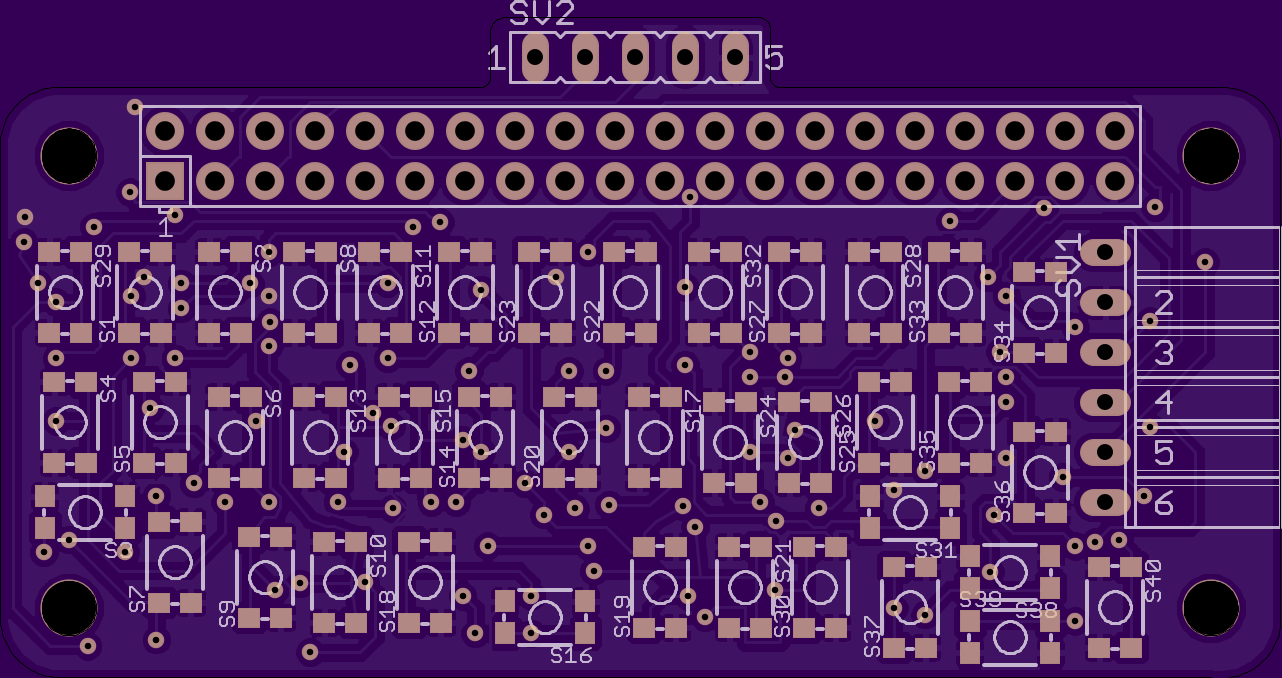
Raspberry Pi Zero Qwerty 40 Hat for Adafruit Hackaday contest

Participating in Adafruit and Hackaday contest about Raspberry Pi Zero. I've proposed somewhat really interesting - a pocket-sized device that can be used on the go to program Arduinos and do a lot of other cool stuff.

https://hackaday.io/project/9582-pi-zero-arduino-programming-station

What you normally don't have in your pocket, but that is absolutely essential for good programming experience is a qwerty keyboard. So I decided to do a Raspberry Pi Zero hat with 40 keys qwerty and headers for directly attaching Arduino Serial connection.

As a monitor you can use your smartphone (with VNC or SSH app) connected via USB or some SPI OLED display connected right to the hat itself.

The project is so much more than just arduinos, but it really requires a lot of time.


вторник, 20 января 2015 г.

Incorrectly flashed atmega328p back to life

Hi,

I'm new to microprocessor programming and all the related stuff (bootloaders, fuses, ISPs, etc.), so I faced a newbee issue.

Symptom:

I was trying to flash atmega328P with bootloader that will suport 8MHz internal clock (so that I don't need an external oscillator) and can be futher optimized in terms of power consumption. I did everything correctly in terms of wiring USBasp programmer (I was using the following instructable), but then unintentionally (I just knew that LilyPad bootloader would also work) I programmed LilyPad's bootloader which also means LilyPad's fuses, which also means (as I later discovered) usage of external oscillator (nice tool to decode fuses).

So, that brought me all the way to "Yikes invalid signature 000000" with usage of -F option in avrdude, or "avrdude: error: programm enable: target doesn't answer. 1" without it. Different "-B" options (-B250, -B5, etc.) didn't work for me. Chip is just completely silent.

And also "avrdude: stk500_getparm(): (a) protocol error, expect=0x14, resp=0xfc" when I try to talk to the MCU via Serial ports with help of FTDI chip. At least I could see that chip is not dead comletely, it's replying something. Probably abrakadabra and maybe it could be decoded by using a proper avrdude settings, but I tried different baud rates and other settings and nothing worked.

Cause:

MCU just expect an external clock source and just doing nothing without it.

Resolution:

Connect an oscillator. But what if you don't have a spare one? Do it like me:


This is a wireless NRF24L01 board and it has an oscillator on it, just connect board ground (yellow on the photo and PIN1 on this wireless board) to your MCU ground and oscillator lines (green and white) to PIN9 and PIN10 on your atmega328P.

This fixed everything for me, Chip is alive and I can see all fuses, so I was able to reprogram them.

Although it's a little bit ackward - because oscillator is 16Mhz and LilyPad bootloader expects 8Mhz.

Hopefully this post will save some time for someone who faced the same issue.

UPDATE:
Looks like this is only a one part of the puzzle, the other one is protocol issue which I also mentioned above, it is still present after a correct bootloader is flashed.

Apparently the issue is with not very accurate internal oscillator - it just doesn't work with high baud rates for programming. There is a very good and detailed explanation on how to fix this by re-compiling a bootloader to use slower upload speed, I do not have necessary tools to do that, so I do think I'm going to do that, I think for me it's OK to load firmware via the ISP


I was able to confirm that it's working and chip is perfoming properly using its internal oscillator. Then I can install a code that will programmaticaly set slower baud rate if I need to talk to the firmware onboard the atmega chip.