вторник, 6 августа 2013 г.

Installing SQL Server Reporting Services on Windows Server Core

Hi All,

A quick post on the subject. I was searching for a while trying to understand why Microsoft limited the ability to install SRS on Server Core. I think mostly because of the fact that you actually need a web browser to work with it, in the configuration tool there are links which should be opened in a webbrowser - which is not installed on the server core.

However there are absolutely no technical limitations whatsoever for running SRS on the core. And I was able to finally find a way to install SRS on it.

A fellow familiar with the setup and how it works(thanks a lot if you are reading it!) helped me identify the name of the check which should be disabled.

So, first of all you should launch the GUI version of SQL server setup. For me it worked correctly only when I launch it from the command prompt and only when I installed GUI management tools feature, here is how you can do this (maybe everything will work even without this):

   Get-windowsfeature | ? {$_.name -like "Server-gui-mgmt*"} | install-windowsfeature

Then I installed everything using the following command

   setup.exe /action=install /features=RS /skiprules=servercoreblockunsupportedfeaturescheck    /iacceptsqlserverlicenseterms /UIMode=enableUIOnServerCore

Setup worked perfectly and now I have SQL server and SRS on Windows Server Core. Which is great!

P.S. Of course you have to have IIS already deployed on the server core and after the installation you need to launch the SRS configuration utility to create a database and web interfaces. (the tool is located at c:\ProgramData\Microsoft\Windows\StartMenu\Programs\... and then in the corresponding SQL server folder)

P.P.S. I was using SQL Server 2012 SP1.

Thanks.


пятница, 4 мая 2012 г.

MS System Center Operations Manager 2012 database move notes

So, it’s been a while since I previously updated my blog.

I currently work with VMware and SCOM products and I wasn’t able to find some information on SCOM 2012, there are a lot of articles regarding SCOM 2007 and most of them works for 2012 version, BUT in case you are moving SQL databases from host to host (for scalability improvements that was first thing I did when after installing SCOM on a single server I realized that performance is ugly) there are some differences and additional steps. So, I wanted to share some notes, there are a lot of guides on how to move Operation Manager databases, you Google them. However, there are the following important things to consider:

- You do not need to backup secure storage encryption key

- There is a stand-alone configuration file for Management Configuration Service (C:\Program Files\System Center Operations Manager 2012\Server\ConfigService.xml) which should be altered after database has been migrated. Just change database server name and database name if necessary. You might need to stop the Management Configuration Service first. Then restart the service and it should connect successfully to a new database.

That’s it. There are some issues with .Net app monitoring service, so I might need to check where it store its configuration, but maybe its configuration will be updated after a while automatically.

While using SCOM I also discovered some other interesting task – monitoring of a remote machine which is outside of the domain you are monitoring (happens a lot in case of a lab). In this case a certification-enabled communication should be used, which requires some configuration steps. maybe I’ll write my next post about this.

UPDATE:

To fix issues with .Net app monitoring, you should also alter settings in the MT_Microsoft$SystemCenter$OpsMgrDB$AppMonitoring table of the Operations Manager DB

среда, 12 января 2011 г.

WDS on D-link routers (connecting Dlink router as a wireless extender to your WiFi network)

Hi,

Looks like in the Internet and on different forums there is a mis-perception that if you want to make a wireless bridge or WiFi extender or WiFi client using another router - you have to either choose router which supports this literally(in the specs) and you have to be using the same routers or your will need to purchase some really expensive routers.

That's not true - I was able to connect DI-524 as a wireless extender to DI-824vup+ and LAN ports of this DI-524 can also use internet and be in the local network

How I did this?

First of all you need to know that almost all D-Link routers have hidden WDS (access point + wireless bridge) mode, you just need to add "/wds.htm" to the URL of your router (http://192.168.0.1/wds.htm for instance). Most people on the internet think that this page is fake and that these devices doesn't have WDS mode - well, as I already said that's not true and all these people probably just were not able to properly configure their devices for WDS.

Secondly let me tell you my configuration of the whole system

Internet "arrives" to DI-824vup+, this device distributes internet to other hosts in my network and provides Wireless network to WiFi clients. This device has 192.168.0.1 IP address in the local network and Wireless. Some devices and computers are connected directly to this router via Ethernet cables or via wireless network.

DI-524 works as a bridge ad access point in the same time (WDS mode). It transmits traffic from wireless and LAN devices (Di-524 has 192.168.0.254 as LAN address) via wireless network to DI-824 and to internet via this router. So I can have an isolated segment of network (isolated in terms of cables - no cables are involved) which is on the same local network and can use internet connection. To this DI-524 router are connected - media player and laptop via WiFi and they both can connect to the internet.

Now to details.

All routers should have the same IP addresses on their LAN interfaces

WiFi setting of Di 824vup+


WDS settings of DI-824vup+ (/wds.htm). In the Remote AP MAC you should but WiFi MAC address of DI-524


Wireless performance settings of DI-824vup+


DI-524 WAN settings should be dynamic IP connection with manual reconnect. So, that device won't try to reestablish internet access which it physically doesn't have.

DI-524 WDS settings (/wds.htm). In the Remote AP MAC you should but WiFi MAC address of DI-824vup+


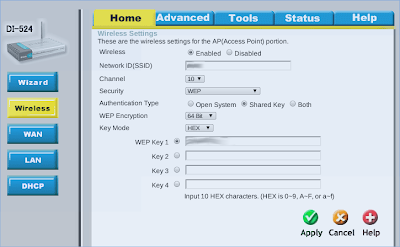
DI-524 WiFi settings (Network ID, channel, security method and secret key should be the same as in DI-824vup+)


DI-524 WiFi performance settings (ssid broadcast should be disabled)


DI-524 DHCP settings - DHCP is disabled (DHCP should work only on "main" router)


That's it - feel free to ask questions in the comments.

среда, 30 июня 2010 г.

Coupling Parallax Robot with iPaq – Part 2

You can read Part 1 here

So, I was able to successfully create a C# application for WinMo5 which reads input from BoeBot and can send data back to the robot. On the BoeBot I uploaded a program which reads data from IR sensors, reports it back to the COM port and wait for instructions where to go to.

The program on the iPaq has a built-in web server which allows me to connect to the application via WiFi and to read data from BoeBot, there is also a text field which can be used to send instructions back to the robot. So, for instance, via WiFi I can send a message to go forward and then receive on the web page values from IR sensors. It’s like a remote control via WiFi via built into the robot webserver.

I’ll post my current source code later.

пятница, 18 июня 2010 г.

Coupling Parallax Robot with iPaq

Recently I started a project of coupling parallax Boe bot robot with ipaq rx1950. Initially I thought it can’t be done since my Boe Bot only have a serial port, but then I found that rx1950 actually has a serial port and I can assemble a connector for this.

You might ask “why do I bother?” – the thing is that I always had a thought of implementing my science work in the university in the real life. It is a neural network which is being trained and programmed by a genetic algorithm. Basically this simulates how homo-sapience and other animals with abilities to collect knowledge evolved through the generations, but with computer you can speedup this process for a neural networks to a few minutes (it depends on the size of the network though).

PBasic that Parallax has in their robots and in controllers is quite modern and quite good language, but it won’t do what I need to implement for the whole thing. Plus, hardware restrictions won’t allow me to collect data for several thousands of virtual “species” (individual configurations of the neural network). That’s why I quickly realized that with BoeBot I can only create an “animal” with the “brain” (neural network), in order to train this thing I have to use external tools. I.E. I could select best fit for the brain, switch boebot on and program it to collect some performance data for the selected brain sample, then I can use collected data on a PC to optimize values. But this process will be very very time-consuming and not scalable and not flexible enough.

So, then I realized that I could use ipaq and connect it directly to the robot. Then I decided to proceed with 2 phases

- Phase I – a program on the iPaq will collect data from robot’s sensors and return back commands for actuators (motors). The program will include neural network and GA (genetic algorithm which will adjust the network).

- Pase II – a program will collect data about robot’s sensors and will train network which resides on the robot itself. So, even if ipaq is switched off, the “animal” will live, it just won’t evolve.

I thought I can use Linux on the iPaq (I already tried to port it and it worked quite well even with the wifi – send me a message if you want to know how, I know that it’s hard for the rx1950), but then I decided that it will be very unstable and again not flexible – it’s hard to compile for embedded Linux (I just never had enough time to learn how to do this). So I decided to go with WinMo5. VS2005+WinMo5SDK are very good development tools I should say, it was very easy to create ComPort application with C# and .Net Compact Framework.

Now I need to put everything together. I’ll let you know what I make.

P.S. iPaq rx1950 pinout for serial port:

http://www.gomadic.com/comipseradca.html

http://pinouts.ru/PDA/ipaq_22p_pinout.shtml

пятница, 6 ноября 2009 г.

Apple AppStore is a nightmare for developers

We submitted an app to the AppStore more than a week ago, usually it take 3-4 days to approve our product, we were OK with that, but when you release a hotfix (X.X.1 version) – why the hell on earth it should take more than a week?

Are you serious? For other our products we still have even older version. This is totally unacceptable, didn’t you know about a huge load that you will experience with all of these apps in the store? Looks like you have a single person per developer, who is wasting their time doing unnecessary QA tests.

I am very disappointed with you Apple! And when developers are very disappointed with platform for which they develop an application – this is something that should be taken care of.

четверг, 10 сентября 2009 г.

Самый простой способ купить билет в Ryanair

Недавно спланировал и съездил с женой в Голландию, Германию и отдыхал на Сардинии. По сложившейся традиции :) отдых = зарплате (никаких накопить, сэкономить, взять кредит). По–этому Тампере, по-этому Ryanair.

Подождал Жутчайшего promotion от Ryanair – все билеты мне обходились по 5 евро итого – 4 перелёта на двоих = 40 евро. Но встала проблема – оплата по visa добавляет к каждому перелёту ещё по 5 евро и стоимость перелётов удваивается – не очень-то радостно. Promotion заканчивался на следующий день – ни она из Visa Electron что была на руках не сработала :). Но “русские не здаются” :) вычитал в интернете что вродебы Промсвязьбанк выдаёт Электроны которые работают, кроме того у них появилась услуга Visa Electron Express или что-то типа того. Поехал – оказалось действительно – платишь 250 р (годовое обслуживание) и тебе за пол-часа выдают Электрон.

Могу подтвердить – хоть на этой карте нету Вашей фамилии, в инете карта работает на ура. Ryanair схавал! :)

Да здравствует победа русской смекалки над иностранным маркетингом – не на тех напали :)

P.S. Правда на след день цена на билет опустилась до 1 евро :)

P.P.S. Чёто я уже писал оказывается :) – ну теперь по русски заголовок :)